Authentication and Credentials
Architecture and Authentication
To understand how the DCP API authentication works, you need an overview of the DCP API architecture, which is shown below.
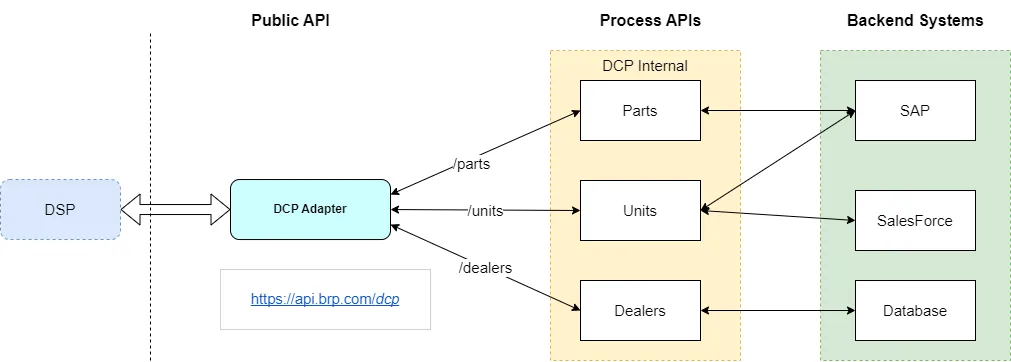
When you call a DCP API, the entry point is the DCP Adapter, the only public DCP API.
When called, the DCP Adapter first validates your Application Authentication credentials. See the section below for more information.
If your credentials are valid, your request is routed to the proper DCP process API, which handles your request by calling the BRP backend systems.
However, for your request to work, you must be authorized to use the DCP API; otherwise, you will receive a status of 401 Unauthorized.
❗ ❗ When starting work on a DCP API, we need to request access by creating a certification ticket in Jira, as described in the section Certification Activities with Jira. ❗ ❗
If you already started work on an API and you lost access, create a support ticket as described in the section Open a Support Ticket.
Authentication Types
The DCP APIs are using 2 types of authentication:
- Most APIs use application authentication.
- A few specific APIs use dealer authentication.
In the API Catalog section, the authentication type used by each API is provided.
Application Authentication
The application Authentication is an oAuth 2.0 token-based authentication. One set of credentials is created for each DSP in each environment.
Note that if you have both a DMS and a CRM and integrate the 2 types of DCP APIs, four sets of credentials are created for you:
- DMS in test
- DMS in production
- CRM in test
- CRM in production
The DMS and CRM credentials are not interchangeable!
❗ ❗ When starting work on a DCP API, we need to request access by creating a certification ticket in Jira, as described in the section Certification Activities with Jira. ❗ ❗
If you already started work on an API and you lost access, create a support ticket as described in the section Open a Support Ticket.
👉 If you were working or are certified on the V2 (XML STAR) APIs below, you already have your Application Authentication credentials.
TheV2 (XML STAR) APIs using the Application Authentication:
- DMS Information
- Sales Opportunity
❗❗ If you never obtained your Application Authentication credentials, open a support Jira ticket to request them ❗❗
The credentials will normally never expire or be revoked (unless you quit DCP).
However, the credentials may change, so your implementation must allow you to easily change and use new credentials.
Get Access Token
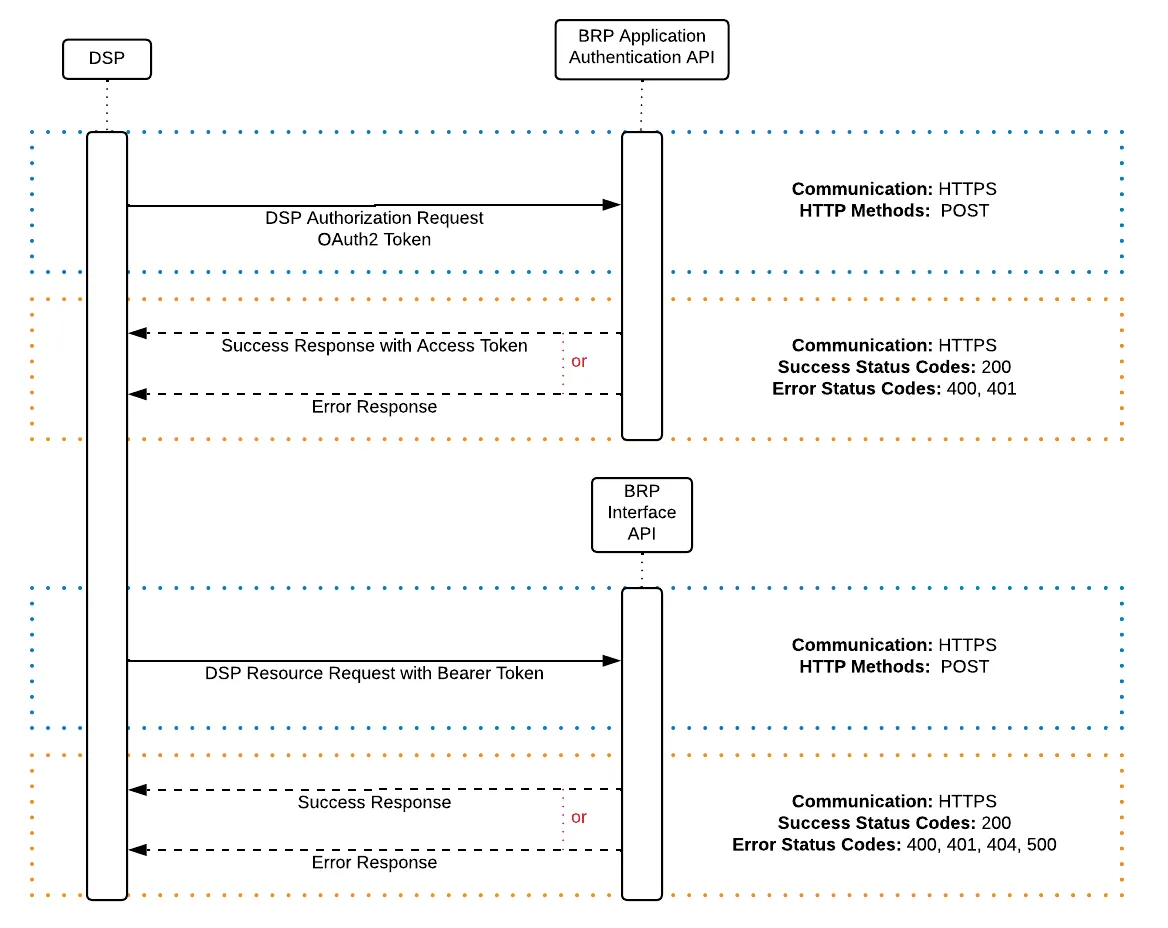
You get the Application Authentication oAuth 2.0 token by calling the Application Authentication API.
The received oAuth 2.0 token is used as a bearer token to authenticate the DSP when calling the DCP APIs.
The oAuth 2.0 token will expire after 30 minutes from the time the token is granted.
Once expired, a status code 401 is returned when calling a DCP API.
You should implement an automated process to generate a new token every 25 minutes.
Dealer Authentication
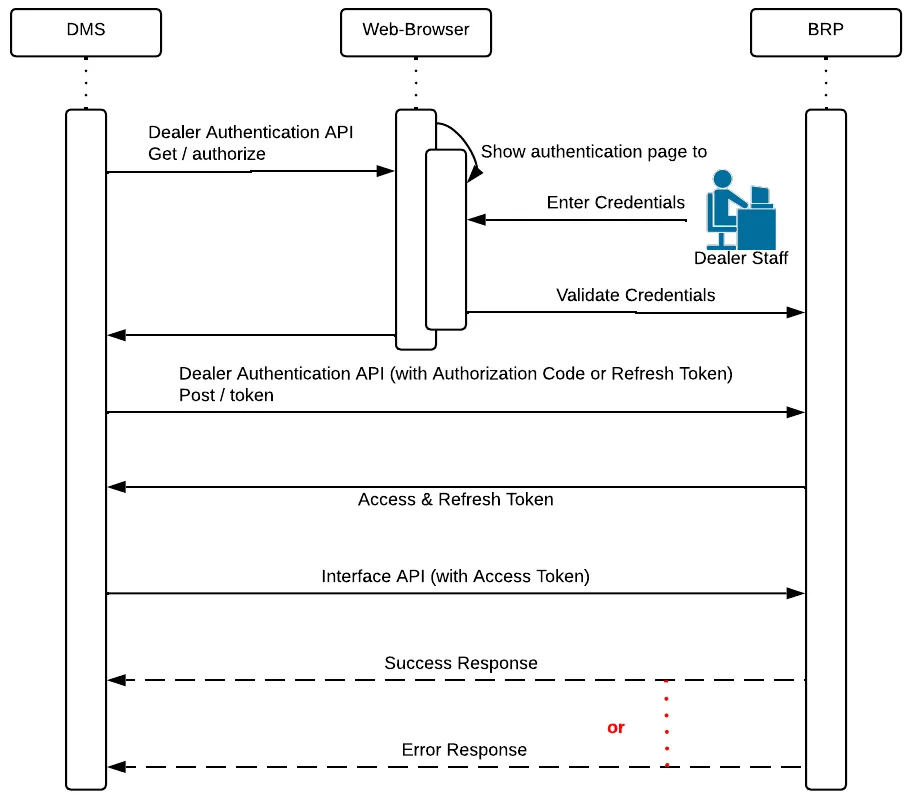
Dealer Authentication is more complex and is used when the DSP and dealer must be identified.
The first step is for the dealer to log in using its BOSSweb account, which is the BRP dealer portal implemented using SalesForce. An authorization code is returned to the DSP.
The second step is to save the received refresh token.
The third step is to obtain an oAuth 2.0 access token using the received authorization code.
DSP BOSSWeb Login
To test your Dealer Authentication mechanism and the DCP APIs using Dealer Authentication, a BOSSWeb account with a specific dealer number is created for you in the test environment.
The information regarding this test BOSSWeb account is sent to you by the DCP Team.
No BOSSweb account will be created for you in production!
Configuration
Before calling the Dealer Authentication service, credentials must be created, and redirect URLs must be set up for the DSP in SalesForce. The DCP team creates a credential set for each environment, and the DSP uses these credentials to call the Dealer Account Management service.
The DSP must provide a redirect URL for each environment.
SalesForce uses the redirect URL to return the authorization code when the dealer logs in.
❗ ❗ The URL used in calling the Dealer Authentication API must match EXACTLY the one you provided for the configuration ❗ ❗
If the URL you provided for the production environment is https://site you have to use the same URL in the redirect parameter in the call to the Dealer Authentication API.
If you use https://site/ or https://Site in the redirect parameter, you will receive an error:
Obtain Authorization Code
The DSP initiates the authentication process and retrieves an authorization code by calling the Dealer Account Management service.
The authorization code is returned through the redirect URL, and the DSP uses it to get an access token.
The authorization code will expire within 5 minutes.
Once expired, a status code 401 is returned when calling a DCP API.
Get Access Token
The authorization token is used to call the Dealer Account Management service to get access and refresh tokens.
The received oAuth 2.0 access token is used as a bearer token to authenticate the DSP when calling the DCP APIs.
The oAuth 2.0 access token will expire after 2 hours after the token is granted.
Once expired, a status code 401 is returned when calling a DCP API.
You should implement an automated process to generate a new token every 90 minutes using the refresh token.
Refresh Token
When you receive the refresh token, save it in the dealer's profile and reuse it to get the access token.
Once the access token has expired, the DSP can use the refresh token and call the Dealer Account Management service to get a new access token.
The received oAuth 2.0 token is used as a bearer token to authenticate the DSP when calling the DCP APIs.
The refresh token remains valid and the same until it is revoked, and it must be reused for each refresh call.
You need to save the refresh token locally; it will not be returned during each refresh call.
The access token must be refreshed before the grant expiration.
Even if the access token is expired, the refresh token stays valid!
The access token is dealer-specific!
One important aspect of Dealer Authentication is that the access token is specific to the dealer number used to get the authorization code.
If you obtain an authorization code for dealer 0000694650 and call a DCP API to perform an operation for dealer 0000691730, you will receive a status code 403 Forbidden.