Technical Information
This section presents basic technical information on the DCP APIs to help you kick off your development.
Environments
There are two environments available to call the DCP APIs: test and production.
The base URL selects the environment to call a DCP API.
Test | https://qa-cloud-api.brp.com/dcp |
|---|---|
Production | https://cloud-api.brp.com/dcp |
Important information:
- The two environments use different sets of credentials
- The test environment sometimes has limited or old data, but it doesn’t affect the API behavior.
- The production environment must be used only for the certification dealer pilot phase and once the API is certified.
Once you have your credentials, the test environment can be used during your development activities to validate the DCP API integration in your DSP.
The test environment is also used during the certification activities described in the Certification Process section.
General Information
This section presents general information on the DCP APIs.
Query Payload Format
All the DCP APIs use a JSON payload for the requests and the responses.
When calling a DCP API to send data to BRP, the payload received by the DCP API is validated against an OpenAPI Specification (OAS).
If the payload received by the DCP API doesn't match the OAS, the DCP API returns an error 400 Bad Request.
When calling a DCP API to send data to BRP, the payload received by the DCP API is validated against an OpenAPI Specification (OAS).
If the payload received by the DCP API doesn't match the OAS, the DCP API returns an error 400 Bad Request.
The JSON object property in error is provided in the error response payload.
For example, if the payload contains a date property and the date format is invalid, the following error response is received.
{
    "status": 400,
    "id": "rrt-07783bca845d5f9ca-d-ea-4205-62358060-1",
    "title": "bad_request",
    "meta": {
        "service": "01",
        "code": "request validation failed",
        "errors": {
            "details": [
                {
                    "message": "[Path '/date_of_repair'] String \"20223-01-10T14:10:09Z\" is invalid against requested date format(s) [yyyy-MM-dd'T'HH:mm:ssZ, yyyy-MM-dd'T'HH:mm:ss.[0-9]{1,12}Z]: []"
                }
            ]
        }
    }
}
This error is generally seen during the DCP API integration in the DSP and is seen during the tests and certification phases.
Response Payload Format
The response payload returned by the DCP APIs is generally prepared using data received from the backend systems. In some cases, a mapping is done between the value returned by the backend and the value returned in the response payload.
It may happen that the values for a field in the response payload are not available, for example, if a value returned by the backend is missing in the field mapping.
This situation is managed using the following rules.
- All the fields are always present in the payload.
- If the field is a string and there is no value to return, the field is set to an empty string (“”).
- If no value is returned for all other field types, the field is set to the null value. For example, if a field is a number or date and the value is missing, the null value is returned
- If the field is an array without value to return, the payload contains an empty array. For example: "pricings": [ ]
Path: Singular versus Plural
The DCP API paths use the singular/plural convention.
- When the endpoint works on a single object, the path uses singular.
- For example, the path is like this when calling the Parts API to look for one part
- The plural is used when the endpoint works on a collection of objects.
- For example, when calling the Parts API to get all the changes since a specific date, the path is like this:
Make sure to verify the API endpoint path in the API Catalog.
Decimal Separator
All the number fields with decimals use the dot(.) as the decimal separator. The coma (,) is NOT supported as a decimal separator.
Pagination
Some DCP APIs return a list of objects. For example, the Parts API returns a part catalog, and the Parts Order API Get service can return a list of parts orders.
In this case, the data is too large to be returned in one response payload, so paging is used to divide the response into many payloads.
A mechanism is provided for the caller to navigate the pages. The response contains the links property, which contains the previous and next properties to navigate the pages.
,
"links": {
"previous": null,
"next": "https://qa-cloud-api.brp.com/dcp/v4/parts?language=en-US&last_changed_date=1900-01-01&sales_org=3020¤cy=USD&limit=200&page=2"
}If previous is null, you are on the first page.
If nextis null, you are on the last page.
Some APIs also return a metaproperty that provides information on the quantity of data is returned, the number of pages, etc.
    "meta": {
        "total_records": 72062,
        "total_pages": 361,
        "current_page": 1,
        "limit": 200
    }
API Catalog
The DCP API technical references are available in the API Catalog section.
For each DCP API, the following sections provide all the needed information on the API.
- Getting Started: an introduction to the API, including the technical and business context.
- Technical Information: authentication, resource summary, limits and constraints, etc.
- The API Reference: the available services with their parameters, payload, etc.
- How-to: examples of how to use the DCP API to accomplish a function.
- Error Handling: information on how to handle the most common errors.
- DSP Requirements: mandatory and optional requirements on how to implement a function using the DCP API. It also contains the certification activities
- Postman: a description of the resources available to validate the DCP API integration using Postman.
API Characteristics
The Characteristics section of each API's Getting Started section presents the general API characteristics, as shown below.
The two most important characteristics are:
- DSP Type: indicates if a DMS, a CRM, or both use the DCP API.
- DCP Version: indicates which DCP versions of the API are compatible.
API Type | DSP Type | DCP Version | Complexity |
|---|---|---|---|
Get data from BRP | DMS | V3 - International | Low |
Send data to BRP | CRM | V4 - North America | A bit more |
Transaction with BRP | | | Somewhat more |
DCP Version
For most DCP APIs, you won't see differences in the payload and calls between versions 3 and 4. For these DCP APIs, the differences are in the backend systems, which is why the API versions are documented in the same section. The Characteristics section of the Getting Started section indicates which DCP versions of the API are compatible.
If there are differences in the payload and/or calls between the DCP versions for a DCP API, the different versions are documents in specific sections of the API Catalog.
For example, the Parts Order API could have a slightly different payload between the V3 - International and V4 - North American versions.
In this case, there would be two sections in the API Catalog:
- Parts Order V3 API
- Parts Order V4 API
DSP Requirements
The DCP Team may define functional requirements for your DSP to make sure that the DCP API integration meets the business objectives.
There are two types of functional requirements that may be defined: mandatory and optional.
Mandatory Requirements
A mandatory requirement is a functional requirement that must be implemented by your DSP.
The requirement implementation is validated and verified during the certification process.
If a mandatory requirement is not properly implemented, the DCP API cannot be certified.
An example of a mandatory requirement is that a DCP API must be automatically called daily to retrieve the last update of the parts catalog.
Optional Requirement
An optional requirement is a functional requirement that the DCP Team strongly suggests you implement in your DSP.
These requirements add business value to the DCP API integration in the DSP. However, the DCP Team is aware that the DSP may have limitations that prevent implementing these requirements, which is why they are optional.
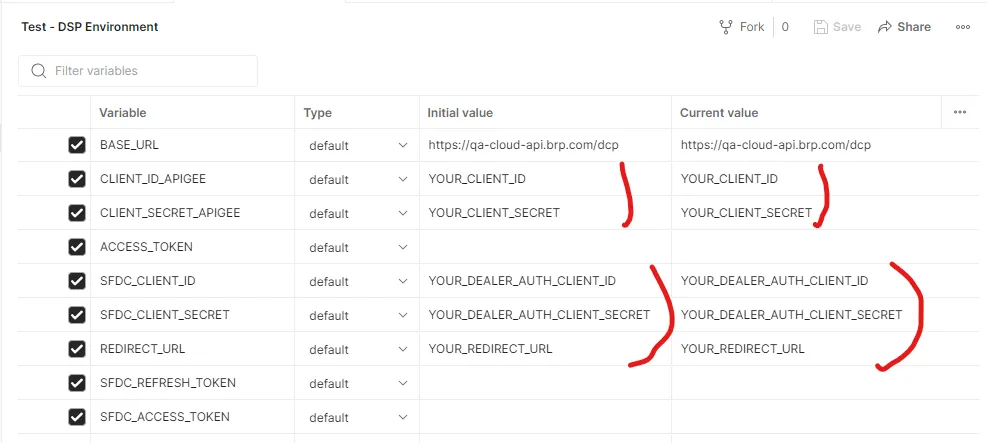
Postman
Most DCP APIs' technical information includes a set of Postman objects: environment and collections.
To use these objects, you have to export them from the shared Postman workspace and import them into your Postman team environment.
Before using the collections and query, you have to change the environment variables to use your information.
You have to change all the values that start with "YOUR_"
Error Handling Overview
Error handling is an important aspect of DCP APIs. The DSPs using the DCP APIs must implement solid error handling to provide the dealer with meaningful information.
The API Catalogue provides the list of specific status codes that can be returned by an API and the steps to take when the status code is received.
Response status codes
The DCP APIs use the RFC 9110 standard range of status codes:
- 2xx (Successful): The request was successfully received, understood, and accepted
- 4xx (Client Error): The request contains bad syntax or cannot be fulfilled
- 5xx (Server Error): The server failed to fulfill an apparently valid request
The DCP APIs return the following status codes.
Status Code | Description |
|---|---|
200 OK | Indicates that the request has succeeded. The content sent in a 200 response depends on the request method. |
400 Bad Request | Indicates that the server cannot or will not process the request due to something that is perceived to be a client error (e.g., malformed request syntax, invalid request message framing, or deceptive request routing). IMPORTANT: the Response Payload indicates the request payload fields or query parameters in error. If there are many invalid fields or parameters, all must be listed. |
401 Unauthorized | Indicates that the request has not been applied because it lacks valid authentication credentials. |
403 Forbidden | Indicates that the server understood the request but refused to fulfill it. For example, the PUT method can be used to update an object that can’t be updated. |
404 Not Found | Indicates that the server did not find the requested objects. |
413 Content Too Large | Indicates that the server is refusing to process a request because the requested content is larger than the server is willing or able to process. |
500 Internal Server Error | Indicates that the server is aware that it has erred or is incapable of performing the requested method. |
502 Bad Gateway | Indicates that the API received an invalid response from an upstream server it accessed while attempting to fulfill the request. |
504 Gateway Timeout | It indicates that the API did not receive a timely response from an upstream server it needed to access to complete the request. |
The section How To Handle Errors provides generic error handling for each used status code 4xx and 5xx. The detailed DCP API specifications in the API Catalog provides error handling specific to each status code.
Response Payload
For the error status code range 4xx and 5xx, a response payload is returned to provide information about the error. The response payload uses a structure based on the JSON API specification for error specifications, as shown in the table below.
❗❗ The status code 504 Gateway Timeout returns a basic response payload since the DCP API can't intercept the error ❗❗
{ "fault": { "faultstring": "Gateway Timeout", "detail": { "errorcode": "messaging.adaptors.http.flow.GatewayTimeout" } } }
Property | Type | Definition |
|---|---|---|
status | string | The HTTP status code applicable to this problem is expressed as a string value. |
id | string | A unique string that identifies the request, generated by Apigee |
title | string | Code that identifies the error or reason phrase One of
|
meta | object | |
meta.service | string | The service code where the error originated. It's an internal DCP API reference that identifies the DCP API. |
meta.detail | string | Details about the cause of the error |
meta.payload | object | The raw response from the service that causes the error (optional) |
For example, a call to a GET method to get an unexisting dealer number would return the following response.
{
    "status": "400",
    "id": "rrt-05cc5cef09974c73d-d-ea-11235-10626775-11.1",
    "title": "not_found",
    "meta": {
        "service": "07",
        "detail": "Backend error",
        "payload": {
            "status": 400,
            "errors": [
                {
                    "code": "Vintage",
                    "title": "PAA Order Validate (API/Method)",
                    "detail": "Please contact Vintage Parts. See bulletin 123981 or www.vpartsinc.com",
                    "meta": {
                        "product_code": "080037100",
                        "item_id": "2833e5ad-ff54-44c1-9058-af64c955faa9",
                        "message": "015 - Warning -Please contact Vintage Parts. See bulletin 123981 for item_id = 2833e5ad-ff54-44c1-9058-af64c955faa9 product_code = 080037100 (/BRP/PART_ORDER/062)"
                    }
                }
            ]
        }
    }
}
How To Handle Errors
400 Bad Request
The status code 400 Bad Request is seen mainly during the integration and tests of a DCP API.
The status code is returned when something in the request is either missing or has an invalid value. For example:
- A required query parameter is missing
- A query parameter has an invalid value
- A payload mandatory property is missing
- A payload property has an invalid value
For example, if the DCP API requires the dealer number in the payload and the property is missing, the following is sent:
{
    "status": 400,
    "id": "rrt-06edc2039f6ce7033-b-ea-23590-61122983-1",
    "title": "bad_request",
    "meta": {
        "service": "01",
        "code": "request validation failed",
        "errors": {
            "details": [
                {
                    "message": "Object has missing required properties ([\"dealer_no\"]): []"
                }
            ]
        }
    }
}
If the dealer number property contains an invalid value, the following is sent:
{
    "status": 400,
    "id": "rrt-0570f8640a6f6ee97-d-ea-31505-59966586-1.1",
    "title": "not_found",
    "meta": {
        "service": "07",
        "payload": {
            "errors": "Dealer number 12345678 is invalid."
        }
    }
}
These errors must be corrected during the integration and test phases.
❗❗ Do not try to resend the payload after a status 400 unless you can automatically fix the problem ❗❗
If the same payload is sent without modification, the same status 400 will be returned.
However, if the DSP user provides a property value or a query value, the error must be converted to something meaningful for the user.
Note that for many DCP APIs, the status code 404 Not Found is returned when an object is not found.
401 Unauthorized
This one is simple: you called a DCP API with the wrong or an expired access token.
{
    "status": 401,
    "id": "rrt-0debaee1f7de5da53-c-ea-8481-2988956-1",
    "title": "unauthorized",
    "meta": {
        "service": "05",
        "detail": "Please verify your credentials or the Bearer token you provided. Contact the DCP team if you need further assistance."
    }
}
To solve this error:
- Make sure to use the right credentials set for the environment (test or production)
- Make sure that your access token is regularly refreshed.
Check the section Authentication and Credentials for information on the credentials.
403 Forbidden
This error is generally found only during integration and tests of a DCP API.
The 403 Forbidden is returned when you try to call an internal BRP API directly without going through the proper DCP API URL.
{
    "error": {
        "id": "rrt-0b8f470f8a6f5fd93-d-ea-17530-62132303-1",
        "status": 403,
        "code": "Not Allowed",
        "title": "Not Allowed to call the API from this origin"
    }
}
The solution to this error is to update the URL you are using to call the DCP API.
404 Not Found
A DCP API that uses a query parameter to find an object, such as a dealer number, part number, or VIN, returns the status 404 Not Found.
{
    "status": 404,
    "id": "rrt-06edc2039f6ce7033-b-ea-23589-61142930-1.1",
    "title": "not_found",
    "meta": {
        "service": "07",
        "detail": "Product code 0126488 not found."
    }
}
Generally, the error should be reported to the DSP user.
413 Content Too Large
The DCP APIs are deployed on APIGee, which has a payload limit of 10 MB. If the payload you send is larger than 10 MB, you will receive the 413 status code.
The only way to solve this error is to ensure that the size of the payload sent when integrating a DCP API is less than 10 MB by splitting it into many messages.
Note that the DCP APIs most likely to encounter this error are the Dealer Parts Inventory and Retail Transactions Data APIs.
500 Internal Server Error
A backend system returns the 500 Internal Server Error status for many reasons, so no specific handling is possible.
If it's possible, the best way to handle the error is to wait for a while (30 to 60 seconds) and call the DCP API again.
It will generally work. But if it doesn't, you can retry a couple of times (3 to 5 times).
If it still doesn't work after many retries, you have to return an error message to the user and contact the DCP Team to report the error with as much information as possible. See the section Getting Support for information on how to report problems.
502 Bad Gateway
The 502 Bad Gateway may occur when the DCP API calls a BRP internal API, which they call a backend system.
If it's possible, the best way to handle the error is to wait for a while (30 to 60 seconds) and call the DCP API again.
It will generally work. But if it doesn't, you can retry a couple of times (3 to 5 times).
If it still doesn't work after many retries, you have to return an error message to the user and contact the DCP Team to report the error with as much information as possible. See the section Getting Support for information on how to report problems.
504 Gateway Timeout
APIGee has a hard timeout of 55 seconds. If the backend system takes over ±50 seconds to return an answer, APIGee returns a status code 504 Gateway Timeout to the calling DSP.
There are two general ways to handle this error
Wait and Retry
The backend system load may cause the timeout. So wait for a while (30 to 60 seconds) and call the DCP API again.
It will generally work. But if it doesn't, you can retry a couple of times (3 to 5 times).
If it still doesn't work after many retries, you have to return an error message to the user.
Wait for Completion
For the transaction DCP APIs, like Parts Ordering, do not retry the transaction!
The timeout occurred because the backend system takes more than ±50 seconds to finalize the transaction, but the transaction is still being processed.
The transaction DCP APIs provide a service to get the transaction status.
Wait for a while (60 to 90 seconds) and call the DCP API service to get the transaction status.
If it's still being processed, wait again and call the DCP API service until the transaction is finished.
To be safe, you can limit the number of retries to 5 to 10 retries.