Certification Process
Why Certification?
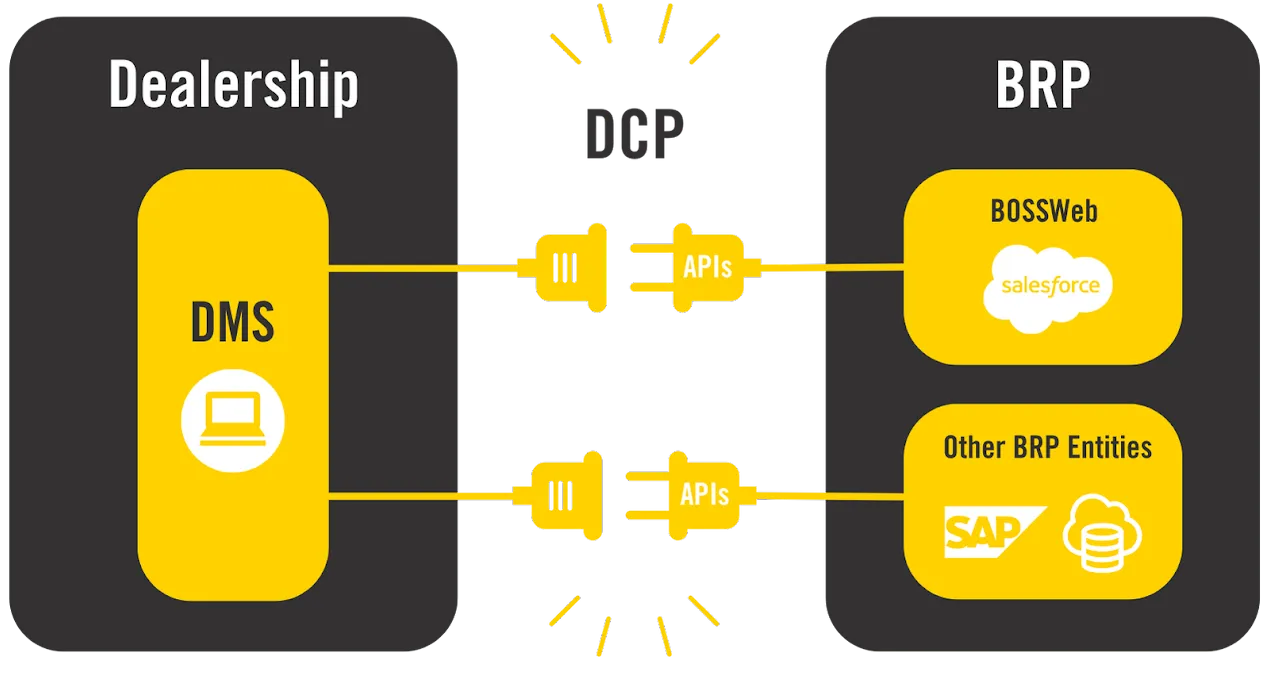
As mentioned in the Why Develop APIs? section, the DCP APIs’ main objective is to support BRP’s dealers' business operations and growth.
In this context, it’s important that the DCP API implementation follows the defined interface and behaviors and that the integration in the DSP supports the business objectives.
The validation is done through a certification process that validates each API integration.
Certification Overview
The certification activities are scaled according to the DCP API complexity and criticality. There are three categories of DCP APIs:
- The APIs used by the DSP to retrieve data, such as the part catalog,
- The APIs used by the DSP to send data to BRP, for example, the dealer parts inventory.
- The APIs are used for transactions, such as ordering parts.
In each category, the DCP API complexity can be:
- Low: small data quantity and simple API calls, such as unit specification.
- Medium: The data is more critical, or there are many different calls, such as parts locator.
- High: The data is more complex/critical, and/or there are many different API calls, such as the retail transactions data.
The certification activities for each DCP API are described in detail in the API Catalog section.
Once all the certification activities are completed, the last certification step is the dealer pilot phase.
Certification Phases
Phase 1: Development
In this phase, you start the development based on the DCP API documentation provided on this portal.
After reading the API documentation, a kick-off meeting can be organized if you have questions.
During this phase, you can use mocks to validate the base DCP API integration and, when you are more advanced in the integration, use the test environment to make calls to the API.
❗❗ When starting work on a DCP API, we need to request access by creating a certification ticket, as described in the Certification Activities with JIRA section found below.
Phase 2: Quality Assurance
During this phase, test, vérification, and validation activities are performed to confirm that the DCP API is properly integrated into the DSP. The DSP requirements specified for the DCP API have also been verified to meet the business requirements. See the section API Catalogue for an introduction to the DSP requirements.
A different set of certification activities is defined for each API category and complexity combination. The certification activities are:
- A demonstration of the function in the DSP.
- Validation of the data received by BRP.
- Formal test cases.
Unless otherwise specified, these activities are performed using the DCP API test environment and the DSP test environment.
While performing the tests, all the API and DSP functions, including the DSP jobs that automatically call the API, must be available and verified.
Phase 3: Dealer Pilot
Using a few dealers, the dealer pilot phase validates the integration and DSP functionality in the production environment.
The dealer pilot phase aims to confirm that the DCP API integration is working as expected in the real production environment and with dealers using the DSP for their normal operations.
During the dealer pilot phase, the main activities are demonstrating the DSP functionality and validating the data received by BRP.
👉 The demonstration can be done by sending screen captures or files or by doing a live session to demonstrate your DSP's functionality.
Dealer pilot conditions vary depending on the DCP API scope, but it is normally conducted with 1 to 5 dealers for 1 to 3 weeks.
While performing the dealer pilot phase, all the API and DSP functions, including the DSP jobs that automatically call the API, must be available and verified.
For example, the Parts API must be called daily to retrieve the parts catalog changes. The job calling the Parts API must be enabled during the dealer pilot phase.
DCP API Certification Status
The DCP Team tracks each API's DSP certification status, which is made available to dealers through the BOSSWeb Knowledge Center.
A DSP can not offer a DCP API functionality to the dealers until the certification process is completed.
Certification Activities with Jira
To help with planning and tracking certification activities, DCP has put in place a ticketing system using Jira.
You are provided access to the DCP Jira when you are ready to start development on the first API. A kick-off meeting is organized with your development team to present the DCP documentation portal and the DSCP Jira ticket system.
👉 The DCP Jira is also used to ask questions, request support, and add/remove team members. Refer to the section Getting Support for more information.
This section describes how to use the certification tickets to manage your certification activities.
❗❗ It's important to create the Jira ticket for an API certification only when you start working on the API ❗❗
In other words, do not use the DCP Jira tickets to create a backlog!
Workflow
The certification ticket workflow is presented in the image below.
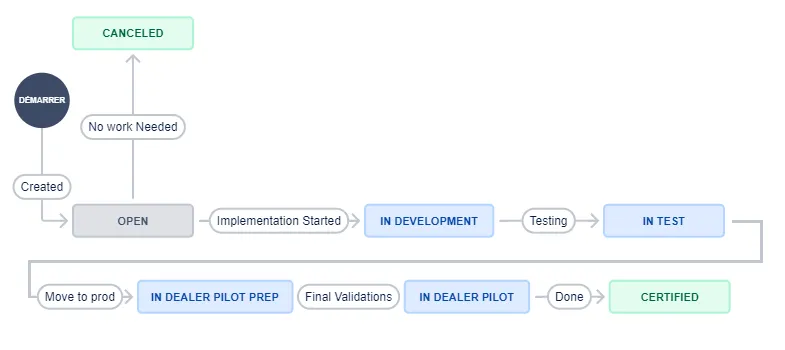
When you are ready to start work on an API, go to the DCP Jira portal and open a ticket for the API.
❗❗ Create the Jira ticket only when you start work on the API ❗❗
The DCP team enables your credentials on the API in the QA environment and changes the ticket state to In Development.
When you are ready to start the quality assurance (test) phase, change the ticket state to In Test. If you have test evidence to provide, like screenshots, attach the files to the ticket.
When the DCP team validates the test results, the ticket state is changed to In Dealer Pilot Prep. During this phase, you prepare the dealer pilot with the dealers, and the DCP team enables your credentials on the API in the production environment.
When the dealer pilot starts, you change the ticket state to In Dealer Pilot. If you have test evidence to provide, like screenshots, attach the files to the ticket.
Once the DCP team validates the dealer pilot results, they change the ticket state to Certified to indicate that the API is certified.
👉 Every time you change the ticket state or enter a comment, the DCP team receives a notification.
It also works the other way: every time the DCP team changes the ticket state or enters a comment, your team receives a notification
The Jira Portal
How To Access
Once you have signed the DCP agreement, a DCP team member will create a group for your company in Jira, and you and your team members will receive an invite via email.
The email contains a link to sign up for the Jira ticketing system. Once you click on the link, you will be taken to the Jira platform to create your account.
✏ 👉 Do not disable the email notification! If you do, you will not be notified when the ticket is updated.
Main Menu
When you go to the DCP Jira portal, the following screen will appear once you log in.
❗❗ Before creating a ticket, check that you are in the DCP Jira portal ❗❗
Check the section Make Sure You Are In the DCP Portal! below.
Click on the API Integration menu.
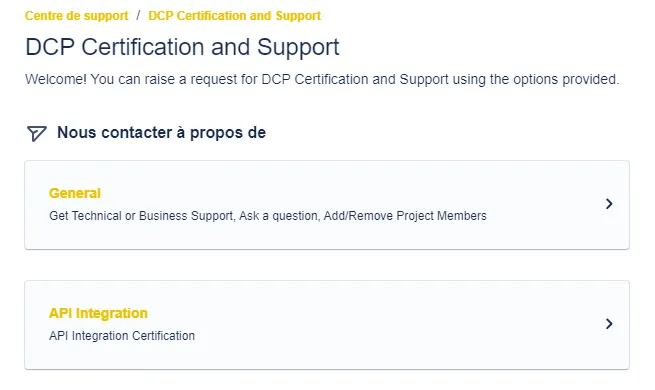
API Integration
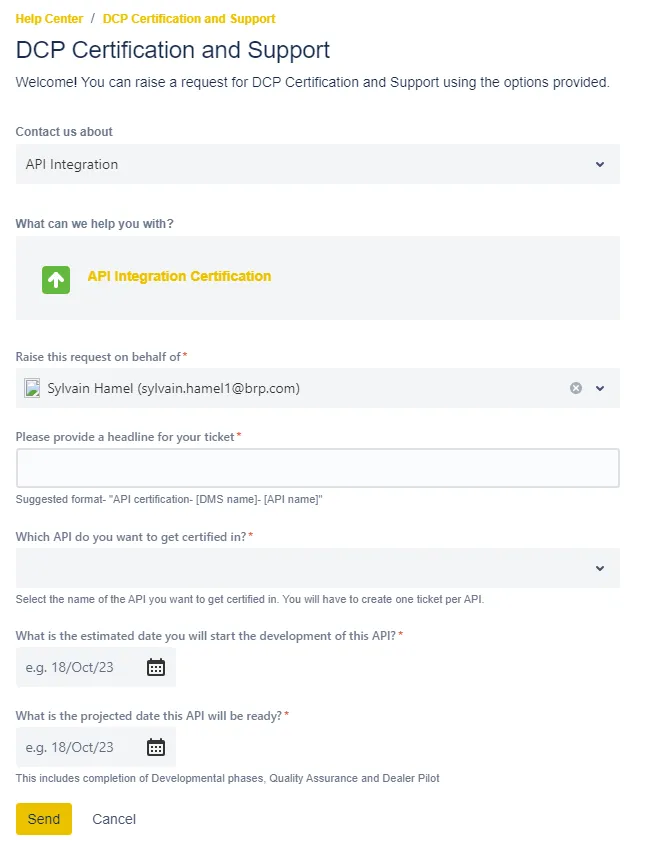
The DCP Certification and Support page is displayed.
- Select API Integration in the Contact us about list.
- Click on API Integration Certification.
- The API Integration Certification ticket form is displayed.
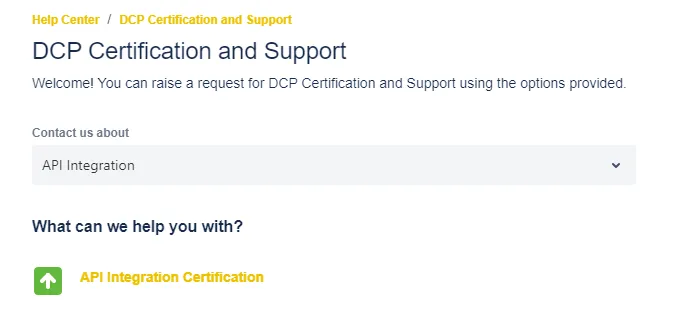
API Integration Certification Ticket Form
A form is displayed where you have to enter the request details.
To help manage the ticket, the headline field should look like this:
API certification - [your organization name] - [API name]
For example:
API certification - MyDMS - DSP Information
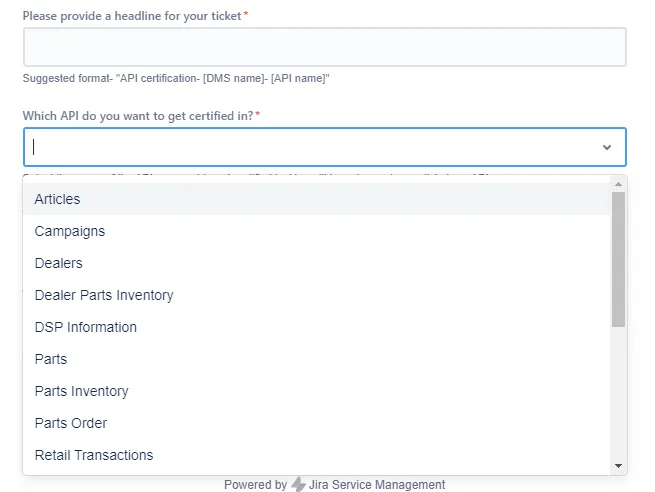
Then select the API in the Which API do you want to get certified in? list.
Finally, provide rough estimates for the start and end dates to help us track your certification timeline and better support you.
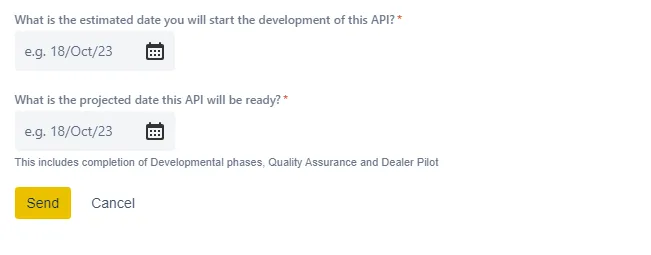
Click Send to submit your ticket.
How to Change a Certification Ticket State
As mentioned in the Workflow section, you have to change a certification ticket state at 2 steps of the workflow:
- When you are ready to start the quality assurance (test) phase, change the ticket state to In Test. If you have test evidence to provide, like screenshots, attach the files to the ticket.
- When the dealer pilot starts, you change the ticket state to In Dealer Pilot. If you have test evidence to provide, like screenshots, attach the files to the ticket.
To change the ticket state, open it and look on the right side of the form, highlighted in green in the image below.
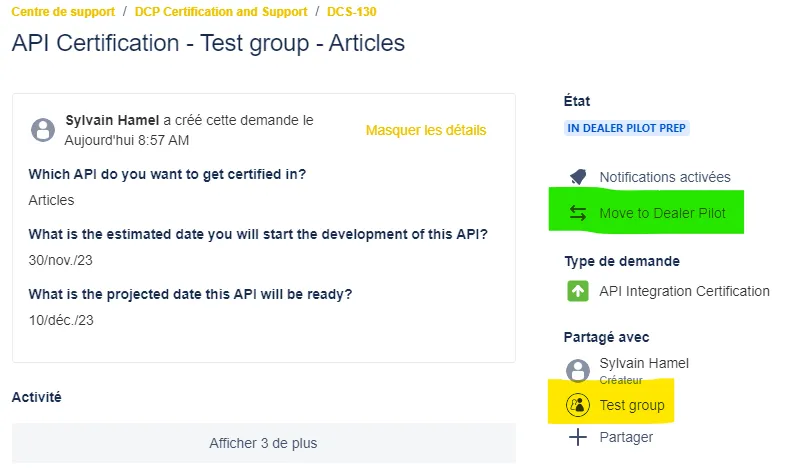
In this example, click on the Move to Dealer Pilot, and a window will open. You can enter a comment and click on Move to Dealer Pilot.
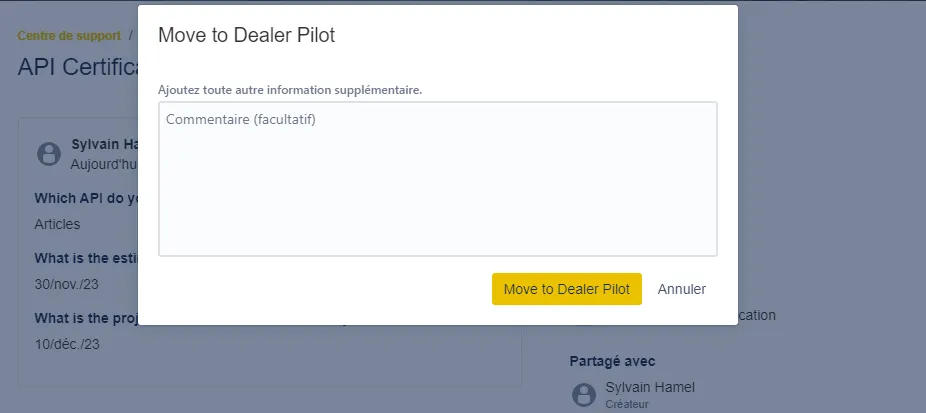
The DCP team receives a notification of the state change.
Make Sure You Are On the DCP Portal!
The DCP Jira is using Jira Service Management (JSM).
🛑 You have access to all the JSM projects at BRP!
So, before creating a ticket, ensure you are in the DCP Certification and Support portal.
When you are in the DCP Jira portal, click on the Help Center link in the top left corner. You will be sent to the main BRP JSM page, where you can see all the portals!
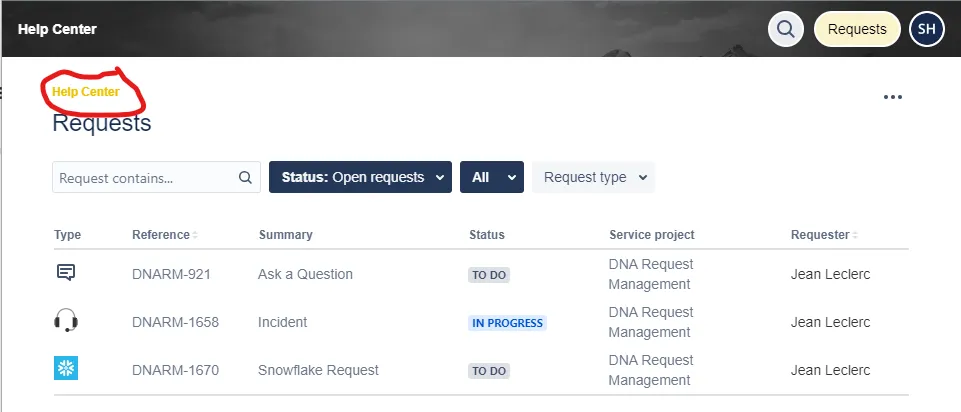
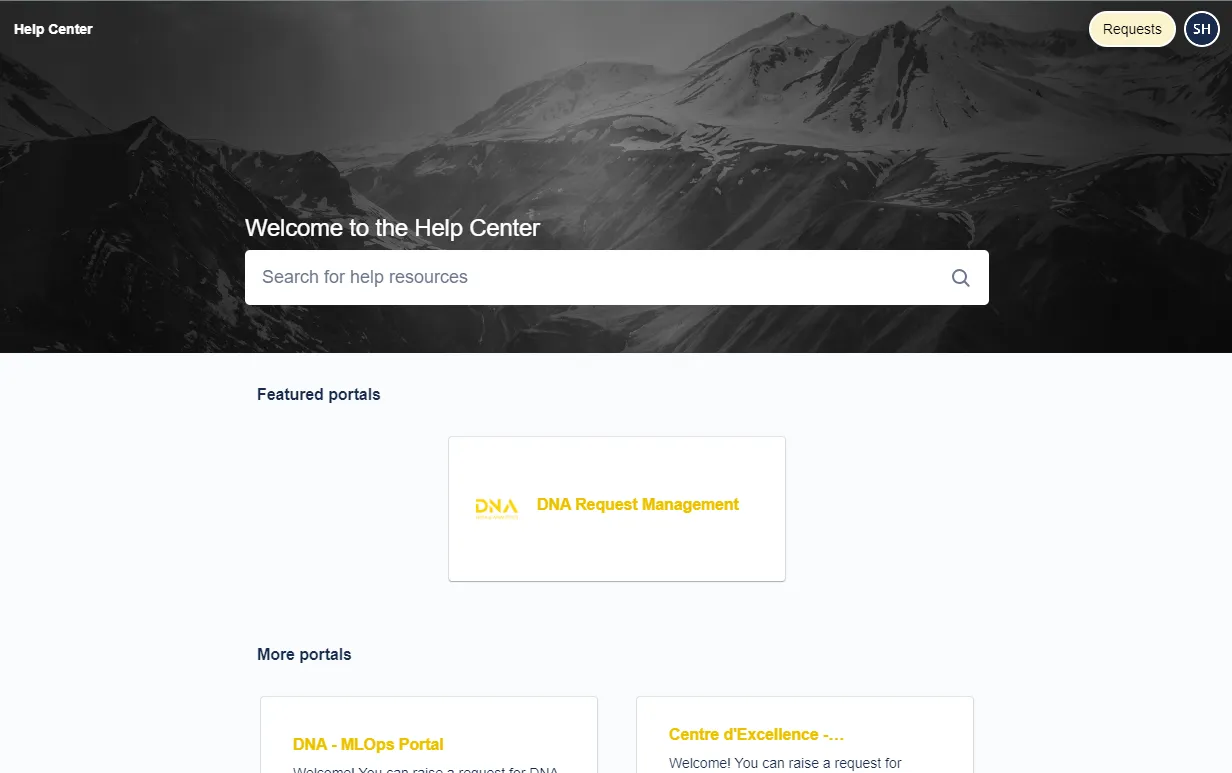
It will be ignored if you create a ticket in a portal other than the DCP Certification and Support portal!
If you are on the Help Center main page, the safest way to find the DCP Certification and Support portal is to use the search field and look for DCP.
A list of help resources is displayed.
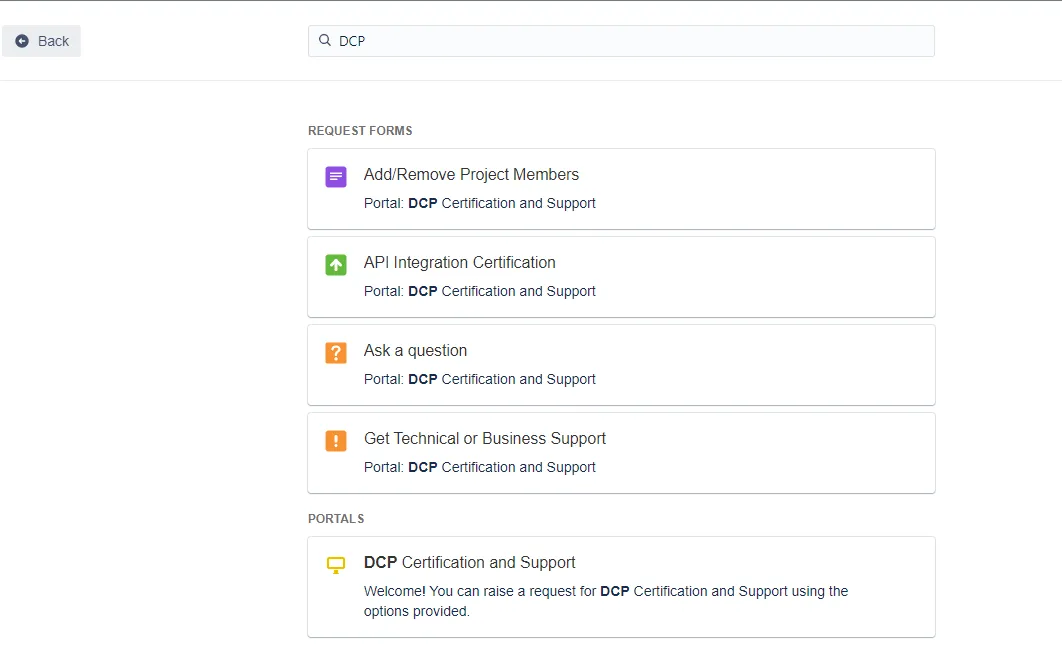
You can open one of the DCP forms from the search result or go to the DCP Certification and Support portal.
Development Roadmap
Unless you and DCP have agreed upon a different roadmap, the APIs are to be developed and certified in the order presented below.
DMS
Priority | API Name |
|---|---|
1 | |
2 | Parts API |
3 | |
4 | |
5 | |
6 | |
7 | |
8 | Dealers API |
9 | Articles API |
10 | |
11 | |
12 | |
13 | Invoices API |
14 | |
15 | |
16 | |
17 |
CRM
Priority | API Name |
|---|---|
1 | |
2 | |
3 | Promotions API (optional) |
4 | Units API (optional) |
5 | Parts API (optional) |